Digital Workplace Software: How German Companies Can Connect Employees, Processes and Information
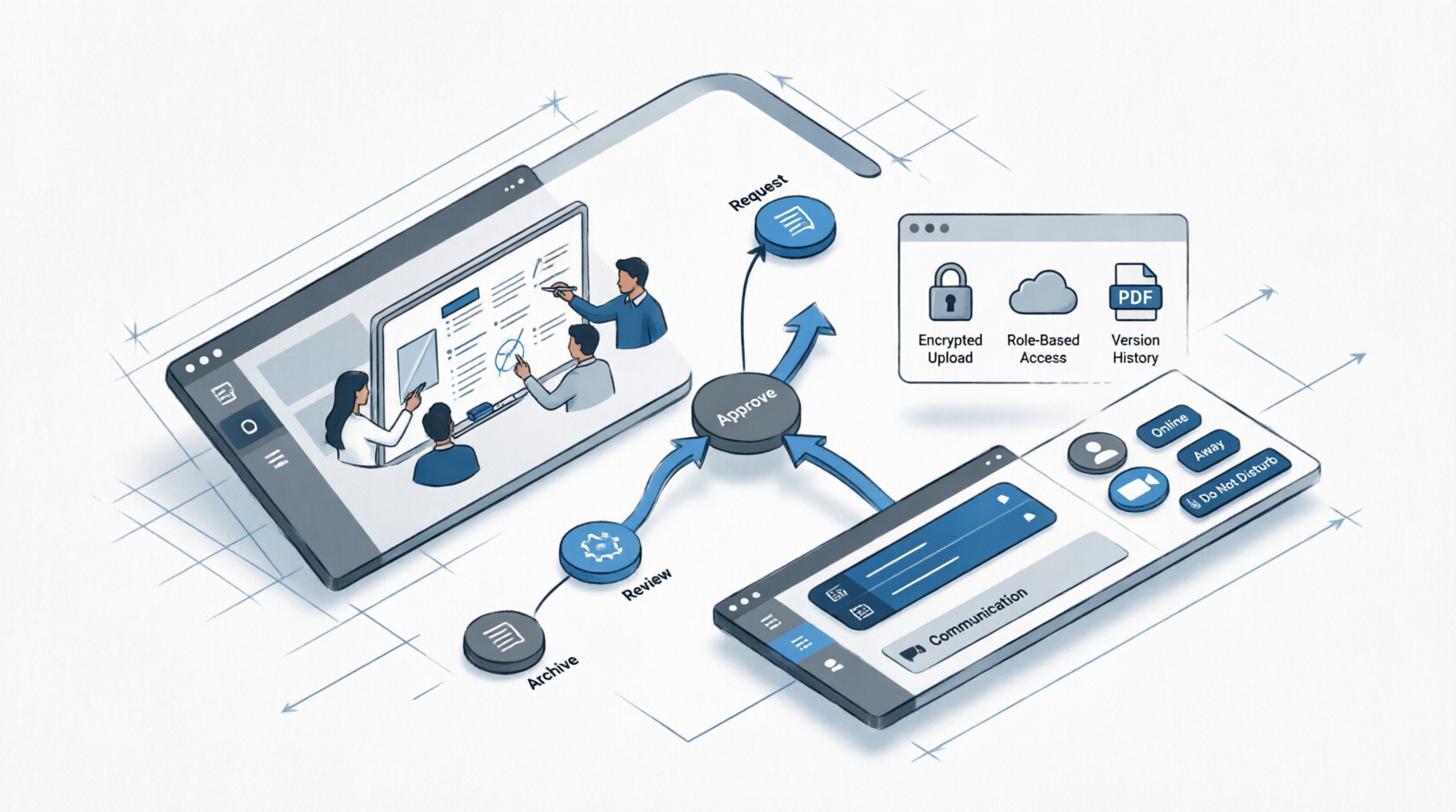
A new colleague needs to book leave, find the latest expense policy, ask the IT team for a laptop and locate last quarter's sales presentation. In many companies that means four different systems, two email threads and a message to someone who "knows where things are". Each tool works on its own terms. The person trying to get something done is left to stitch them together.
Digital workplace software tries to remove that friction by giving employees a coherent environment for communication, information and everyday processes. This article looks at what the term covers, which components matter, how to avoid the usual pitfalls, and what German companies should check before buying or building one.
What a Digital Workplace Is, and What It Is Not
A digital workplace is the combined set of tools, content and processes through which people do their work. Every company already has one, even if it has never been designed. The question is whether it has been designed or has simply accumulated.
As a product category, digital workplace software usually refers to a platform or suite that brings several functions under one roof: an intranet for company information, collaboration spaces, messaging, document access, search, employee self-service and links into business applications. Some are standalone products, others are built on top of existing collaboration suites such as Microsoft 365 or Google Workspace.
It is not the same as a single chat tool, and it is not simply an intranet with a new name. The distinguishing idea is connection: the same employee can find a policy, start a request, see the status of a task and talk to the right colleague without switching context repeatedly.
The Problems It Is Meant to Solve
The symptoms differ between companies, but several recur. Information is spread across drives, email and chat, and nobody is certain which version is current. Employees spend time searching for answers that exist somewhere. Requests for HR, IT or finance arrive as informal emails, are handled inconsistently and cannot be tracked. Communication from management reaches only those who read email, which excludes colleagues on the shop floor, in warehouses or in the field who may not sit at a desk.
Hybrid work adds another layer. When some people are in the office and others at home, informal information flow that once happened in corridors has to be replaced deliberately. Companies that skip this step often find that remote colleagues receive information later and with less context.
It helps to identify which of these problems you actually have before looking at products. A company whose main difficulty is reaching production staff needs different features from one whose main difficulty is finding documents.
Core Components Worth Evaluating
Intranet and company communication
This is the place for news, policies, organisation charts, onboarding information and announcements. Look at how content is organised, how easily non-technical staff can publish, and whether targeting is possible, so that a message for the Munich site does not clutter the feed of everyone else. Mobile access matters for employees without a company laptop.
Search and knowledge access
Search is often what decides whether the platform becomes a habit. A good system searches across documents, pages, people and connected applications, respects permissions, and returns relevant results quickly. Test it with real questions from your staff. Poor search is the reason many intranets are abandoned within a year.
Collaboration and messaging
Teams need spaces for projects and departments, with chat, shared files and task tracking. If you already use a collaboration suite, ask how the new platform complements it instead of competing. Running two overlapping chat systems tends to fragment communication rather than improve it.
Employee self-service and workflows
Leave requests, travel expense claims, equipment orders, IT support tickets and onboarding checklists are typical examples. Moving these from email to structured forms with routing and status tracking saves time for both requesters and administrators. Map each process before digitising it, because automating a confusing process only makes the confusion faster.
Integration with business applications
The platform becomes far more useful when it connects to HR, ERP, CRM and ticketing systems, so that an employee can view payslip information, approve a purchase request or check a customer record without leaving the environment. Ask which connectors exist as standard and which would need development. Single sign-on and consistent permission handling are practical requirements here.
German Requirements: Data Protection, Works Councils and Accessibility
Digital workplace tools touch employee data directly, so several German-specific questions arise early.
Data protection: check where the platform is hosted, how access by the vendor's staff is controlled, how the contract covers processing on your behalf under the GDPR, and how data can be exported or deleted when an employee leaves.
Works council: where a works council exists, software that can monitor behaviour or performance usually requires its involvement. Usage analytics, activity feeds and presence indicators can all raise questions. Involve the council during selection rather than after the decision, and take legal advice on what applies in your organisation.
Accessibility and language: the interface should work in German, support employees with different abilities, and handle multilingual content if your workforce is international. Employees who struggle with the tool will go back to email.
Why Adoption Matters More Than Features
Many digital workplace projects end up as well-designed portals that few people visit. The cause is usually that the platform does not help with anyone's daily work. Staff go where the tasks are. If leave requests still arrive by email and the policy library is out of date, they will keep emailing.
Start with a small set of things people do every week and make them clearly easier: finding a document, requesting equipment, checking a shift plan. Involve employees from different roles, including those who do not sit at computers, in designing and testing. Appoint content owners for each area so that information stays current. An intranet page with a policy from three years ago damages trust in everything else on the platform.
Leadership behaviour matters as well. If managers keep announcing decisions by email, employees learn that the platform is optional. Decide which channel is the official one for which type of message, and stay consistent.
Standard Platform, Customisation or Bespoke Build
Most companies are best served by starting with an established platform and configuring it. This gives faster rollout, ongoing product development and lower risk. Costs include licences per user, implementation, integrations and support, and it is wise to estimate these over several years, including growth in headcount and added modules.
Customisation or custom development becomes relevant when processes are unusual, when the company runs industry-specific applications that need tight integration, or when specific user groups such as field staff or production workers need a tailored interface. Firms in northern Germany sometimes engage providers offering Softwareentwicklung in Hamburg to build connections between the workplace platform and logistics or maritime systems, where employees work across sites and shifts.
Planning a Rollout
Begin by listing the top five frustrations employees raise about finding information and getting things done. Use those to define the first release. A phased approach, starting with one department or location, makes it easier to learn and adjust. Measure usage in ways that are meaningful, such as how many requests are submitted through the platform instead of by email, rather than counting logins.
If your IT team has limited capacity for integration and development, temporary external support through Softwareentwicklung Outsourcing can add capacity, as long as decisions about processes and content ownership remain within the business. For companies that want tailored portals or mobile apps for specific employee groups, teams offering Softwareentwicklung in Berlin are another option. As with any supplier, ask for comparable examples and clarity on documentation, ownership of the code and post-launch support.
Conclusion
Digital workplace software works when it reduces the effort of everyday tasks and gives every employee, whether at a desk, on a production line or on the road, a reliable place to find information and get things done. Technology choices matter, but clear content ownership, involvement of employee representatives and a focus on real daily tasks matter more.
A practical first step is to ask ten employees from different departments to write down the last three times they could not find information or had to chase a request. Group the answers by theme. The patterns will show which part of the digital workplace to fix first and give you concrete scenarios to test in any vendor demonstration.